

October 2026: DeliveryOS and Bloomreach
Faster Shopify setup, label-free returns in Sweden and quicker DHL tracking.

Stephanie Branston

Meet the products behind Ingrid Agentic DeliveryOS
We've renamed our products so each one matches a part of delivery: knowing the shopper, making the delivery promise, keeping shoppers updated, moving the parcel and handling the return. Analytics shows what delivery drives across all of them. Identify, Promise, Engage, Transport and Care each come in Essential, Premium and Enterprise tiers, so you can choose the level that fits your business.
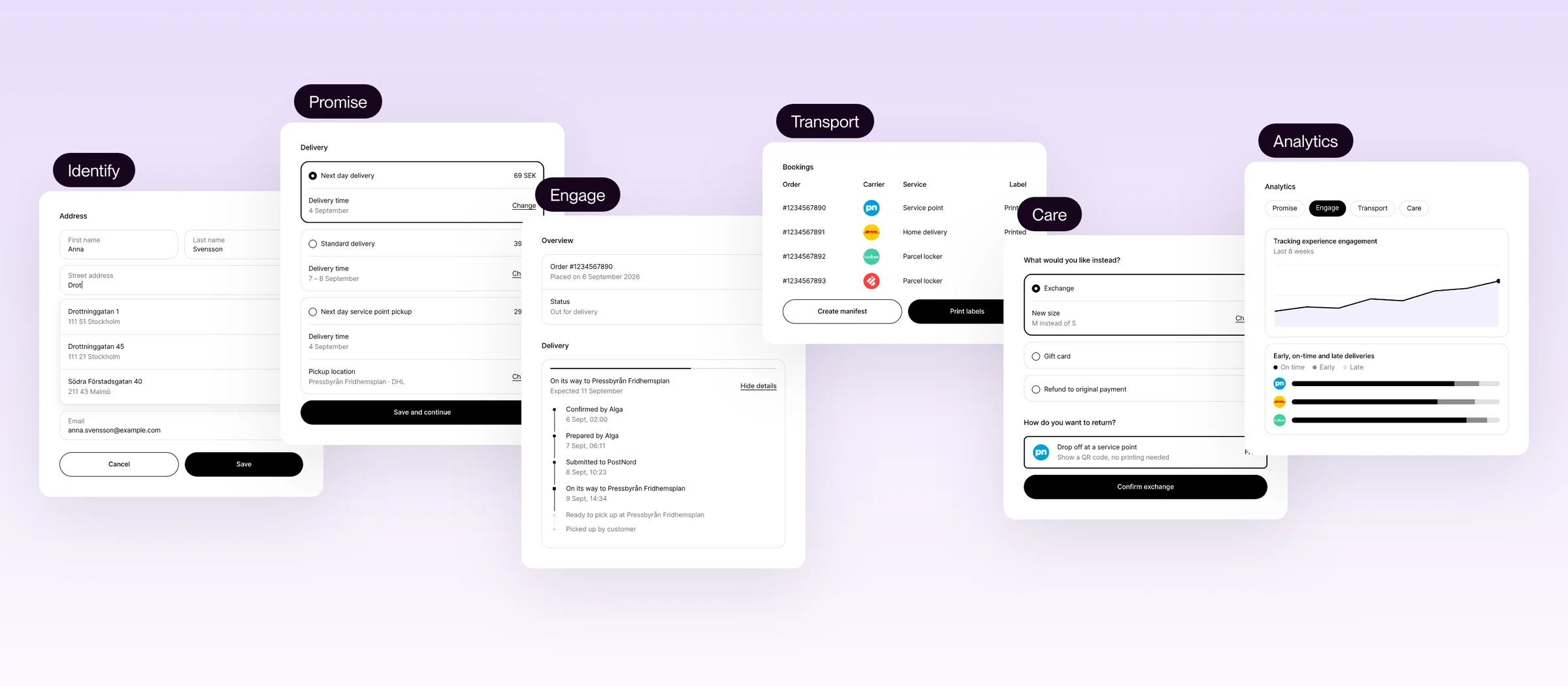
- Identify (formerly Address form): reduce checkout friction and address errors, and recognize returning shoppers.
- Promise (formerly Checkout): give shoppers delivery choices they can trust, increase conversion and protect margin.
- Engage (formerly Tracking): keep shoppers informed and flag delays before they contact support.
- Transport (formerly Transport and In-store): run carrier booking through one system, with less manual work in carrier portals.
- Care (formerly Returns): keep more revenue with exchange-first returns, and make returns simpler for shoppers and your team.
- Analytics: connect delivery performance to conversion, revenue and margin.
Send delivery updates into Bloomreach
Retailers on Bloomreach can send Ingrid's order and parcel updates straight into Bloomreach customer profiles, from order confirmed and out for delivery to delayed, delivery failed, delivered and pickup-ready.
Those events can trigger email, SMS, push or WhatsApp messages from the retailer's own Bloomreach scenarios and templates, so shoppers can hear about a delay before they reach out to support. They also feed segments, like shoppers with a delayed parcel or a recent delivery, for targeted follow-ups.
Retailers choose which events to send and what to call them, and can send every tracking update under one event name and branch on the event type in a single Bloomreach flow.
See the Bloomreach integration guide.
Show delivery estimates on Shopify pickup points
Shoppers on Shopify stores can see when their parcel is expected to reach each pickup point, before they choose where to collect it.
The setting is “Show delivery estimate on every pickup point” in the Pickup Points block, and it's off by default.
Preview Ingrid checkout in the Shopify editor
Retailers can check how their Ingrid setup looks before publishing. The Shopify checkout editor displays sample delivery estimates, carrier logos, labels and pickup points, which makes the delivery section easier to review before shoppers see it.
Keep shopper addresses on Shopify pickup orders
A new address setting in the Shopify app keeps the address a shopper enters at checkout on pickup orders, while the pickup point details are stored in the order's Ingrid attributes.
Existing behavior stays in place unless the setting is changed.
Leave gift cards out of Shopify cart value
Free delivery thresholds and other rules based on the cart total can ignore gift cards, digital products and services on Shopify stores, so those items don't have to unlock free delivery.
The setting is “Include gift cards and digital items in cart value” in the advanced-checkout block. It applies when “Share cart value as item property” is on, and it's on by default, so nothing changes unless it's switched off. Completed orders also no longer add these items back into the total sent to Ingrid.
Open the Ingrid Shopify app in about a second
The Ingrid admin page in the Shopify app opens in about one second, down from around eleven seconds, so getting to Ingrid settings in Shopify is quicker.
Book deliveries with the options checkout offers
Manual and edited deliveries in the Ingrid app can be booked with the same options checkout would offer that shopper for those items, including time slots and pickup points. The shopper's own choice and the recommended option are marked, and pickup points are listed nearest first.
If a saved option or pickup point is no longer offered, the app flags it instead of swapping it silently.
Transport orders can also be filtered by source and date and exported to CSV, and carrier products can be searched by name, carrier or code.
Clear Norwegian customs with Bring VOEC
Retailers with a VOEC contract with Bring can send their VOEC number and the required customs data with Bring bookings. VOEC is Norway's VAT on E-Commerce scheme. Parcels to and from Norway then clear customs automatically, with Norwegian VAT pre-collected.
Offer label-free DSV returns in Sweden
Shoppers in Sweden can return parcels at DSV service points using a QR code, with no label to print.
DSV emails the QR code straight to the shopper, and the return portal tells them to look out for it.
Get faster DHL tracking updates
Tracking events for DHL Freight, DHL Paket and DHL Parcel Connect reach Ingrid by push instead of polling, so updates arrive faster and are no longer capped by daily quota limits.
If push is unavailable, Ingrid falls back to polling automatically, so tracking keeps running.
Deliver from the Czech Republic with DHL Freight
Retailers delivering from the Czech Republic can use DHL Freight for outbound deliveries to the EU, the UK, Switzerland and Norway.
Three products are supported: Euroconnect International for B2B, Home Delivery International for oversized B2C deliveries and Euroconnect Domestic.
Offer next-business-day delivery with Posti
Posti Express Parcel, Posti's premium time-sensitive service, brings next-business-day delivery across the Baltics. It's supported across checkout, booking and tracking.
Find every guide in the new Ingrid Help Center
All 328 Ingrid guides sit in one place in the new Ingrid Help Center, organized by product, so the right one is quicker to find.
Get answers from the Help Center's AI assistant
You can ask questions about Ingrid any time in the Help Center chat, where an AI assistant replies based on the guides. When it can't help, you can talk to a member of the support team in the same chat.
Brand the tracking widget and tracking page
The tracking widget and tracking page can match each retailer's brand. The guide walks through what can be customized and how to get the settings applied.
See the tracking widget and tracking page guide.
Move or merge Shopify stores in the returns portal
Retailers moving to a new Shopify store, or merging several stores into one, have a guide that covers what to do on the returns side.
See the Shopify store migration guide.
Move an Ingrid setup to Shopify Advanced Checkout
A step-by-step guide covers moving an Ingrid setup to Shopify Advanced Checkout.
See the Shopify Advanced Checkout migration guide.
Split deliveries with Shopify Advanced Checkout
Split deliveries work with Shopify Advanced Checkout, and the updated guide adds an FAQ on discounts and how the cart value is shared.
See the Shopify guide.
Set delivery time units and formats
A new guide explains how delivery time units and formats work in Ingrid checkout, and how public holidays and cutoff times are applied.
See the delivery time guide.
